Building with an agent
An agent writes a file and reads what comes back. How the session goes, how many turns it takes, whether the agent finds its own mistakes, whether a person has to sit and watch, follows from what comes back.
Gomamochi's commands are shaped for that reading. Two of them build nothing and open no window, and each answers one question: can Gomamochi take this, what does it draw, and will the shipped app do the same.
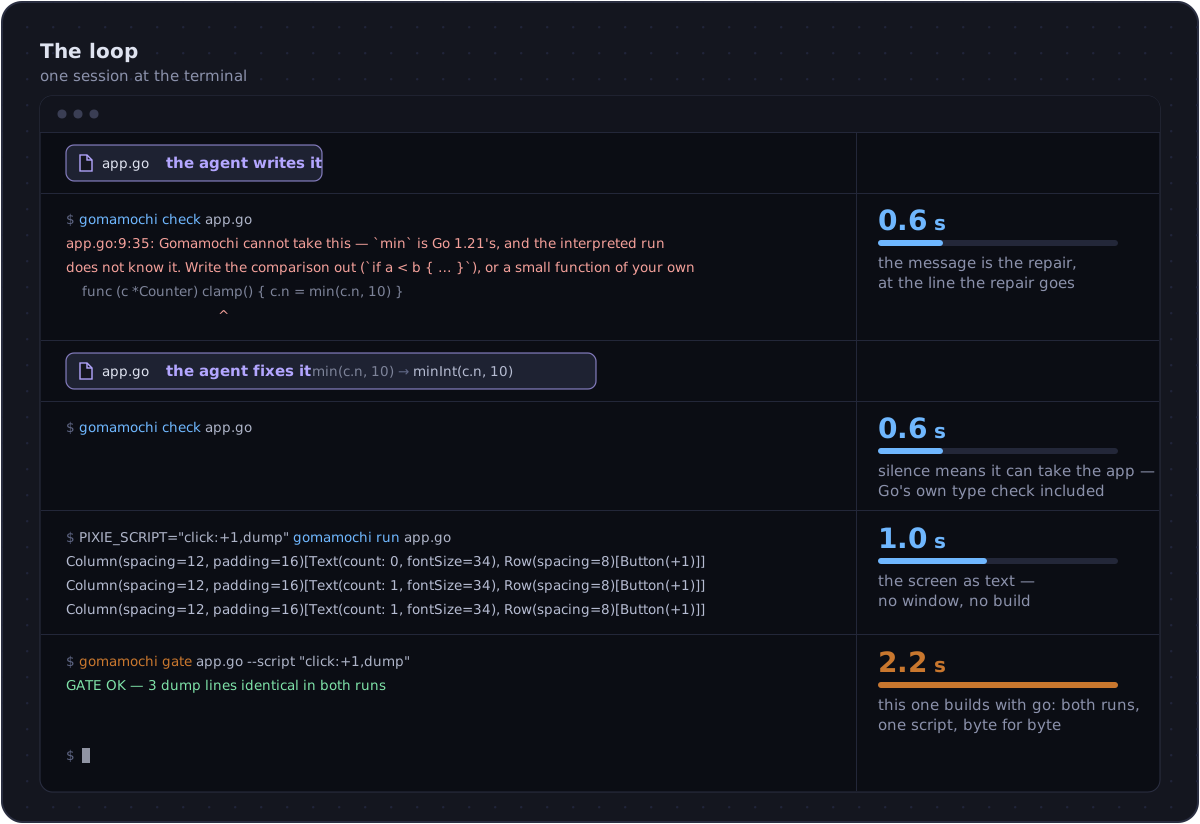
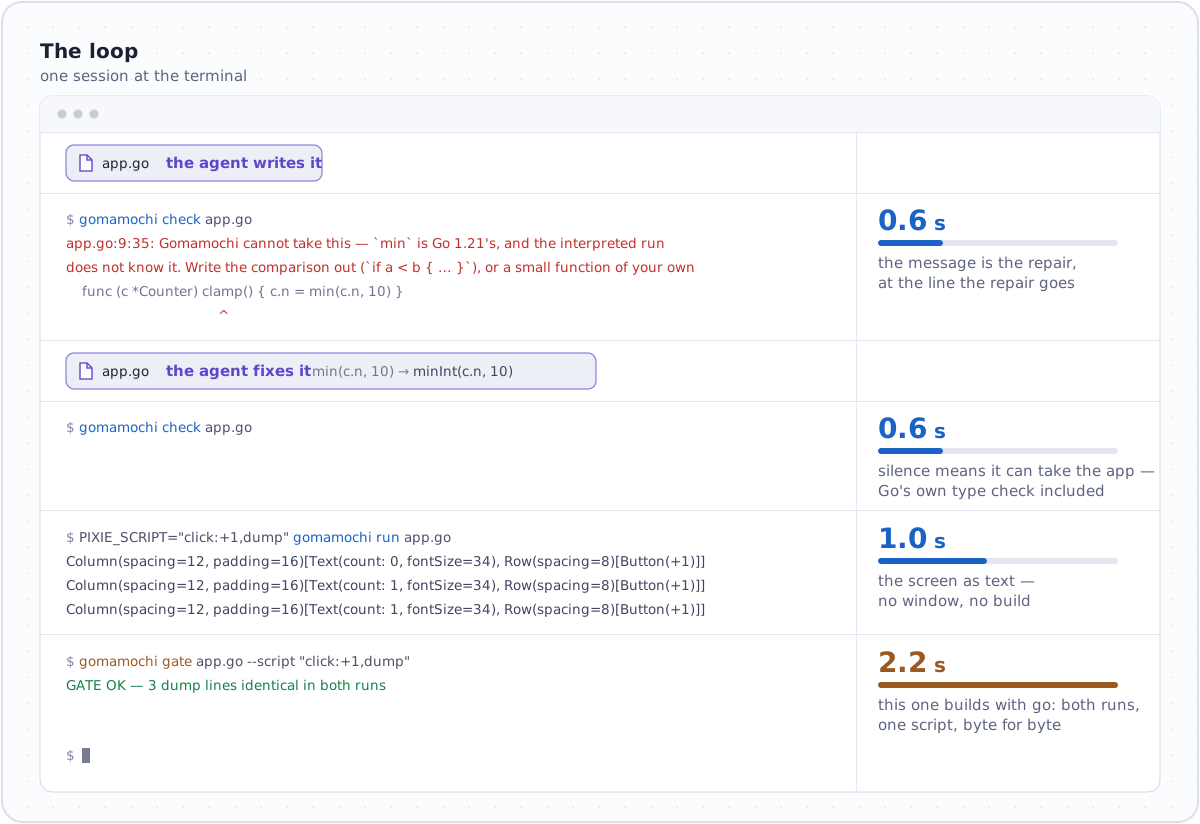
Three commands, three answers
gomamochi check — can Gomamochi take this?
$ ./bin/gomamochi check app.go
app.go:9:35: Gomamochi cannot take this — `min` is Go 1.21's, and the interpreted run does not know it. Write the comparison out (`if a < b { … }`), or a small function of your own
    func (c *Counter) clamp() { c.n = min(c.n, 10) }
                                      ^
It prints the refusal in file:line:col form with the line under it
and a caret at the column, and says nothing at all when it can take
the app. It reads the file with Go's own parser first; then, with go
on the path, it type-checks the file the way the compiler will, so a
misspelt method or a wrong type comes back as Go's own error, in Go's
own words. Nothing is built either way, so the answer comes back in
well under a second.
The message is not "no": it is the repair, at the place the repair goes. What Gomamochi refuses is the whole list, each quoted from the file that holds its wording.
A headless run — what does it draw?
$ PIXIE_SCRIPT="click:+1,dump" ./bin/gomamochi run app.go
Column(spacing=12, padding=16)[Text(count: 0, fontSize=34), Row(spacing=8)[Button(+1), Button(+10), Button(reset)], TextField(), Text(hello, )]
Column(spacing=12, padding=16)[Text(count: 1, fontSize=34), Row(spacing=8)[Button(+1), Button(+10), Button(reset)], TextField(), Text(hello, )]
Column(spacing=12, padding=16)[Text(count: 1, fontSize=34), Row(spacing=8)[Button(+1), Button(+10), Button(reset)], TextField(), Text(hello, )]
With PIXIE_SCRIPT set, run opens no window: it builds the tree,
drives it with the steps and prints the screen as text, once at the
start, once for every dump, once at the end. About a second, and the
app is not built: the interpreter reads the file as it is.
This is the answer to "did the button do what I meant", and it is readable without a screen. The steps are listed under Headless runs and the gate.
For anything drawn on a canvas, PIXIE_FRAMES=<dir> writes a PNG after
every step, painted by the same rasterizer the window uses, so an agent
can look at what it drew and not only read it.
gomamochi gate — will the shipped app do the same?
$ ./bin/gomamochi gate app.go --script "click:+1,dump"
GATE OK — 3 dump lines identical in both runs
  script:   click:+1,dump
  binary:   demo/.gate/app/app (2.9 MB)
This one builds. It compiles the app with go build, runs the binary
and the interpreter with the one script and compares the transcripts
byte for byte; a first build of the engine takes minutes, and every
round after that about two seconds. A red gate prints the two
transcripts and the first line where they differ.
The loop, in one session
- Write the file.
checkuntil it is silent. Every answer names the repair, so this costs turns rather than thought.- A headless run with a script that presses the things you added. Read the dump; it is the screen.
gatewhen the shape is right. That is the build, and it is the proof.build --release --appwhen it is done.
Steps 2 and 3 are the loop, and neither of them builds anything. Step 4 leaves the loop.
What to hand an agent
- The tour, starting here. It is written in the order the
language is met, and every complete example on it is gated by the
sweep, so nothing on it is a shape
checkrefuses. - The elements page, generated from the one table. Every method an app may call, with its type and default; a method not on it does not exist, and Go says so.
- What Gomamochi refuses, so a refusal is recognised rather than worked around.
- A demo close to the task, from the gallery. Each one is a whole file, gated, and short.
Two things worth telling it
Read the refusal, do not route around it. Every message names the rewrite. An agent that treats a refusal as a wall will write something stranger; an agent that reads it writes the intended Go.
A dump is a screen. There is no need to ask a person whether the window looks right until the tree says it is right. The dump is what the gate compares, so an agent that reads dumps is looking at the same thing the gate is.