Building with an agent
An agent writes a file and reads what comes back. How the session goes — how many turns it takes, whether the agent finds its own mistakes, whether a person has to sit and watch — follows from what comes back.
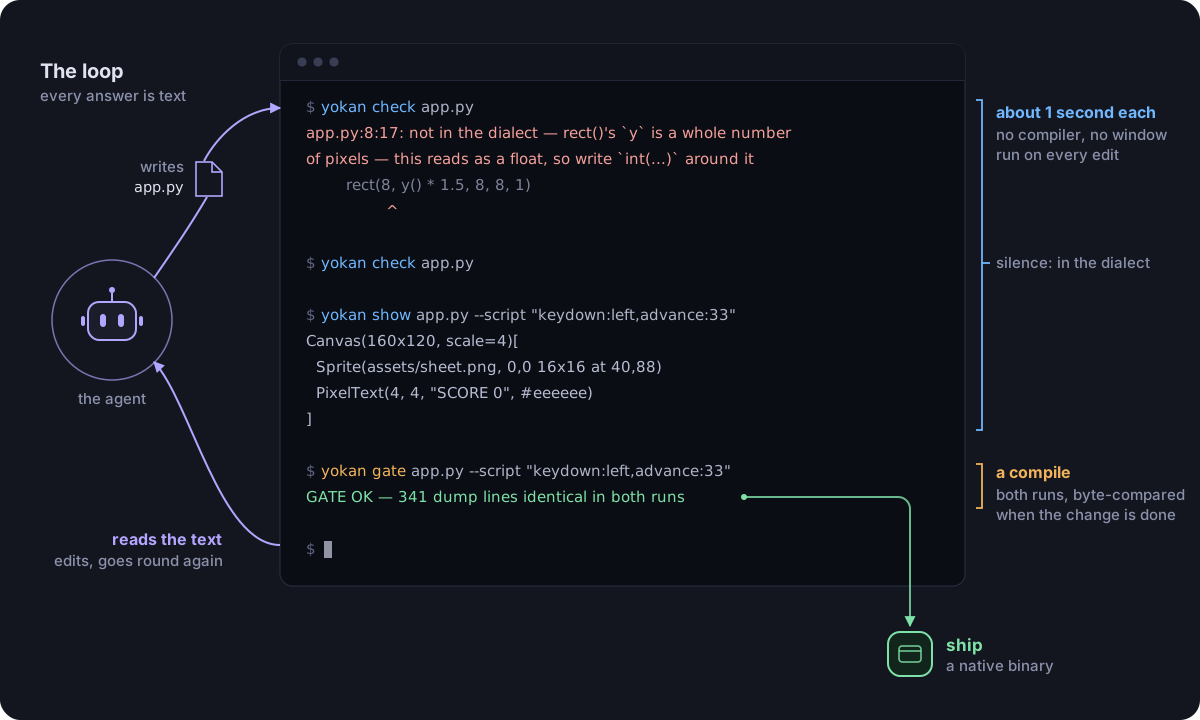
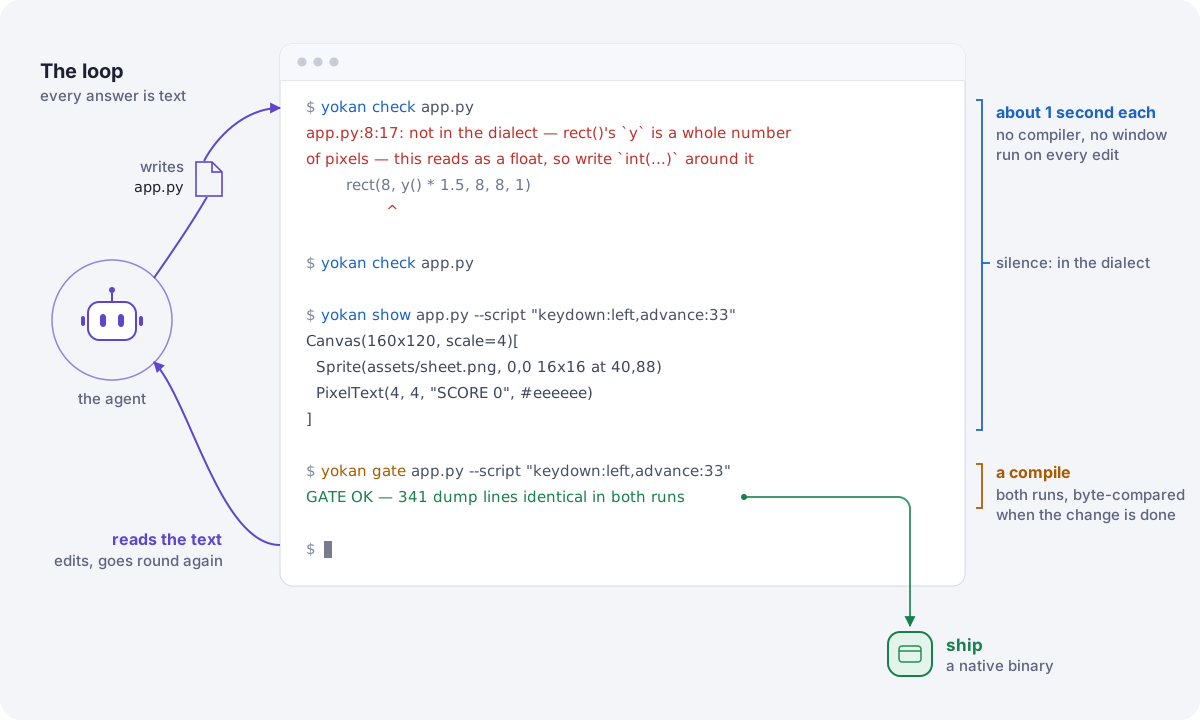
Yokan's three commands are shaped for that reading. Two of them start no compiler and open no window, and each answers one question: is this inside the dialect, what does it do, and will the shipped app do the same.
Three commands, three answers
yokan check — is this inside the dialect?
$ yokan check app.py
app.py:8:17: not in the dialect — rect()'s `y` is a whole number of pixels — this reads as a float, so write `int(...)` around it
        rect(8, y() * 1.5, 8, 8, 1)
                ^
It reads every module the app imports, prints every refusal it can find in file:line:col form with the line under it, and says nothing at all when the app is inside the dialect.
One run answers the whole file, which is the round trip an agent would otherwise pay per refusal.
No compiler is started, so the answer comes back in about a second.
The refusal names what to write instead.
The message is not "no": it is the repair, at the line where the repair goes.
--strict fails on warnings too.
yokan show — what does it do, and how does it look?
$ yokan show app.py --script "keydown:left,advance:33,advance:33" --frames shots/ --scale 3
Column[Canvas(160x120, scale=4, bg=#000000)[
  Sprite(assets/sheet.png, 0,0 8x8 at 54,100)
  PixelText(4, 4, "SCORE 0", #eeeeee)
]]

3 frames in shots/
The app runs against the script with no window, and the screen is printed as text. The script is the vocabulary of what a person can do — click, type, press a key, drop a file, let 33 ms pass — so "what is on screen after two frames of holding left" is a question with a printed answer.
With --frames it also writes a PNG of each step's canvas, drawn by the same rasterizer the window uses.
The dump says what a frame is, command by command; the PNG says what it looks like.
yokan gate — will the shipped app do the same?
$ yokan gate app.py --script "click:+1,input:Momo" --release
GATE OK — 2 dump lines identical in both runs
This one compiles. It replays one script through the development run and through the compiled binary, and compares the screens byte for byte; when they differ it prints the line from each run, side by side. It is the slow step, and the only one that needs a compiler. The work happens in the other two, and this one runs when a change is done.
Why the answers are text
No display is involved in the first two, so they work over ssh, in CI, and wherever else the agent happens to be running. Nothing waits on a window being drawn.
A dump is stable text: the same elements in the same order, formatted the same way every time. That is what makes a diff between two runs meaningful, and what makes an assertion on one line a test.
The same run, from a test
An app is a Python module, so its tests are Python tests.
The wheel registers a pytest plugin, so a suite gets the run as a fixture: app is the app module imported without running it, and run drives it with no window.
# tests/test_app.py
def test_clicking_counts(app, run):
    assert "count: 2" in run(app, "click:+1,click:+1")


def test_the_screen_is_what_it_was(app, run, snapshot):
    snapshot(run(app, "click:+1"))       # recorded, then compared


def test_the_compiled_run_agrees(gate):
    gate("click:+1")                     # the gate, from inside the suite
yokan init writes the first of those beside a new app, and a workflow that runs them.
Handlers, store methods and value classes are ordinary Python too, so the parts that are only computation can be tested by calling them. A test says the app does the right thing; the gate says the compiled app does the same thing. The tour covers both in full.
What the loop cannot tell you
The gate proves that the two runs agree, not that the window looks right. A layout can be wrong identically in both. Spacing, colour and whether the screen reads at all are the part that still wants an eye: build it, launch it once, and look — and if a person is around, that is the moment to ask them.
Giving an agent the guide
skills/yokan/SKILL.md
is the whole dialect in one file, written for an agent: every refusal, and what to write instead.
Put it where your agent looks for skills — for Claude Code that is ~/.claude/skills/:
$ curl --create-dirs -o ~/.claude/skills/yokan/SKILL.md \
    https://raw.githubusercontent.com/i2y/yokan/main/skills/yokan/SKILL.md
An agent that has read it writes inside the subset from the start, instead of finding the boundary at build time. The refusals are still there for when it steps outside, which is what makes the first of the three worth running on every edit.