Verify and ship
The tour concludes: type checkers, headless runs, the gate, shipping — and what does not work yet.
Working with type checkers
Yokan bundles type stubs, so checking with pyright (Pylance in VS Code) works out of the box.
The stubs declare the runtime's actual shapes.
@store binds the singleton instance to the class name, so Settings.set_dark(True) counts as a bound method call, and handler references like on_change=Settings.set_dark pass as the expected (bool) -> None.
@model and @value declare that constructors are synthesized from the fields, and Weak[Node] appears to a checker as Node | None (which is exactly what a read means).
mypy has a known limitation: it does not apply type transformations made by class decorators.
Under mypy, @store method calls are therefore misreported as "self is not passed".
We recommend pyright for checking.
A type checker knows Python's types, not the dialect's boundary.
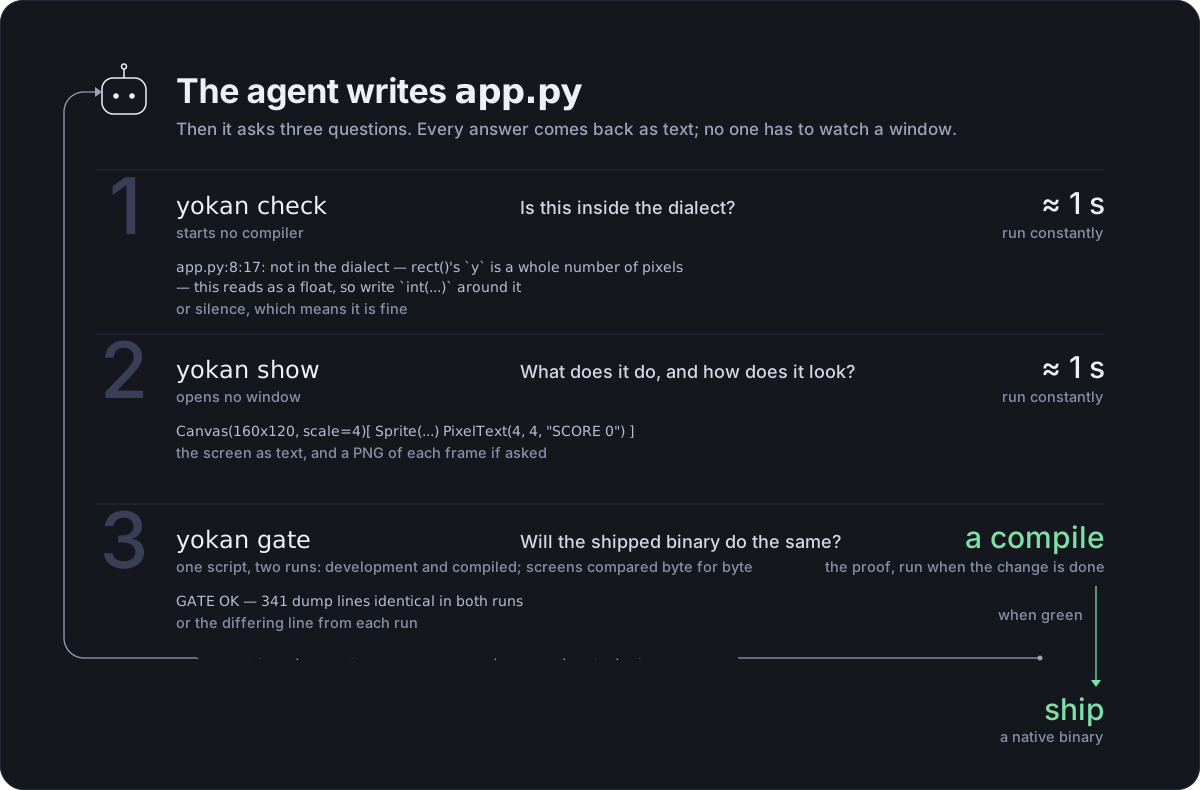
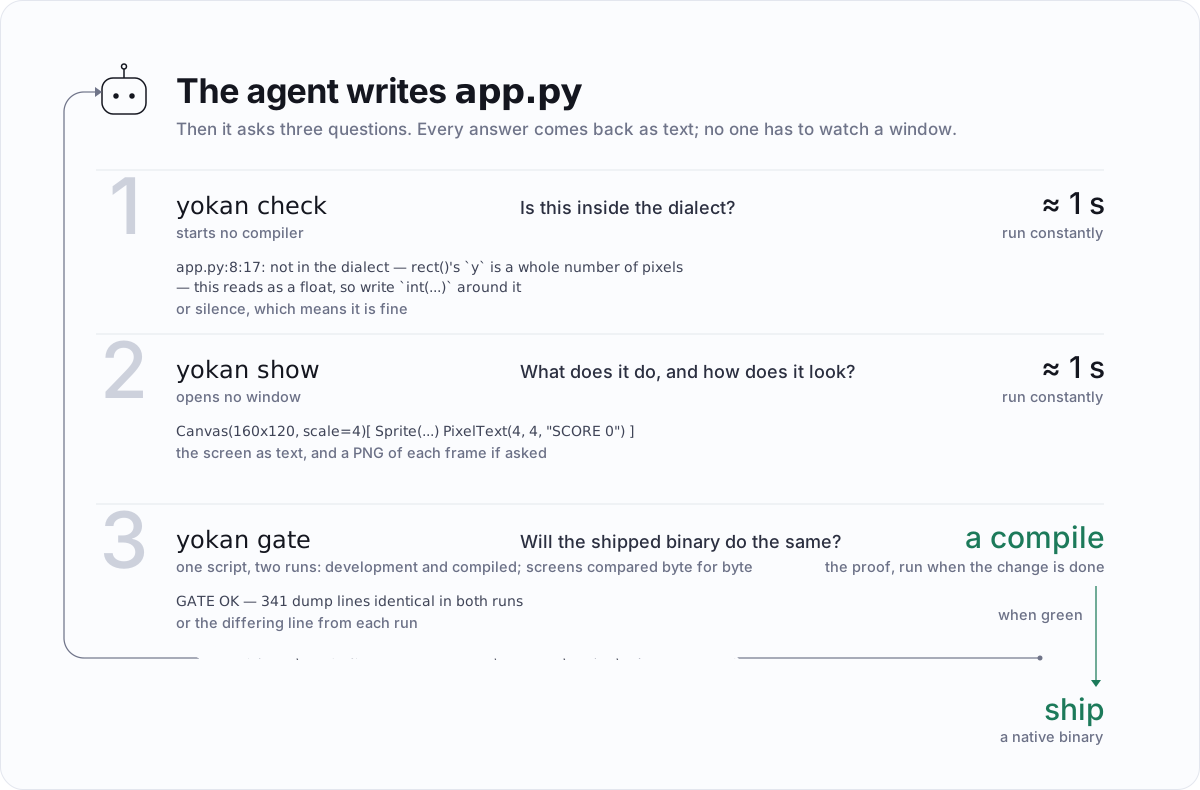
yokan check app.py answers that half: it checks every module the app imports, prints every refusal it can find in the file:line:col form, and says nothing when the app is inside the dialect.
Each module-level statement and each line of the view is checked on its own, so one run answers the whole file rather than sending you round again for the next one.
A statement that reads something whose own declaration was refused is counted as unchecked instead — the message would be about the declaration that never happened, not about the line that reads it.
No compiler is started, so it is the check to run while editing.
check also warns.
A warning is not a refusal: the app translates, and something in it is still worth changing.
$ yokan check app.py
app.py:37:9: warning — these assignments make a reference cycle: b.parent → a.kid → b. The compiled run counts references and never frees a cycle (the CPython you develop on collects it), so write the reference that points back as `Weak[...]`.
            b.parent = a
            ^
Today's warnings are about memory. A cycle is never freed in the compiled run while the CPython you develop on collects it, so the two runs differ. No dump shows that difference, which makes it the one thing the gate cannot check for you.
Two shapes are caught.
One is the field types: strong references that close a loop through two or more model classes (Kid.owner → Parent.kids → Kid).
The other is a handler that writes the round trip (a.kid = b, then b.parent = a).
The second catches a model that references its own class, where the types alone cannot tell a ring from a list or a tree.
--strict turns a warning into a failure.
Editors
yokan check is what an editor runs, and it needs nothing installed beyond Yokan itself.
It prints file:line:col: message and the line with a caret under it, says nothing when the app is inside the dialect, and takes about a tenth of a second.
It reports every refusal it can find rather than the first, so one run answers the whole file.
Vim and Neovim need two settings and put the refusals in the quickfix list:
setlocal makeprg=yokan\ check\ %
setlocal errorformat=%f:%l:%c:\ %m
autocmd BufWritePost *.py silent make! | redraw!
:copen lists them, :cnext walks them, and each entry opens the file at the column.
VS Code reads the same shape through a problem matcher.
In .vscode/tasks.json:
{
  "version": "2.0.0",
  "tasks": [
    {
      "label": "yokan check",
      "type": "shell",
      "command": "yokan check ${file}",
      "presentation": { "reveal": "silent" },
      "problemMatcher": {
        "owner": "yokan",
        "fileLocation": ["autoDetect", "${workspaceFolder}"],
        "pattern": {
          "regexp": "^(.+?):(\\d+):(\\d+): (.+)$",
          "file": 1,
          "line": 2,
          "column": 3,
          "message": 4
        }
      }
    }
  ]
}
The refusals then land in the Problems panel, on the lines they are about. VS Code has no built-in way to run a task on save, so this is a key binding or the command palette unless you add an extension that watches for saves.
Any other editor takes it the same way: the format is the one compilers have printed for forty years, which is why check prints it.
Inside a checkout the command is uv run yokan_gate.py check <file> instead, and nothing else changes.
Testing
An app is a Python module, so its tests are Python tests, in whatever runner you already use.
yokan.headless(view, state, script) runs the app against a script with no window and answers the screen as text — the dump before the steps, then the dump after — and a test asserts on that.
Between edits, yokan show is the same run from the command line, and it can leave a picture behind.
$ yokan show app.py --script "keydown:left,advance:33,advance:33" --frames shots/ --scale 3
Column[Canvas(160x120, scale=4, bg=#000000)[
  Sprite(assets/sheet.png, 0,0 8x8 at 54,100)
  PixelText(4, 4, "SCORE 0", #eeeeee)
]]

3 frames in shots/
It refuses first (so a mistake costs a second, not a compile), runs without a window, prints the screen, and with --frames writes a PNG of each step's canvas — --gif assembles those into one file if ffmpeg is around.
No display is involved, so it works over ssh and in CI, and what it draws is the same rasterizer the window uses.
That is the fast half of the loop; yokan gate is the slow half, and it is the one that proves the shipped run agrees.
# tests/test_app.py
def test_clicking_counts(app, run):
    assert "count: 2" in run(app, "click:+1,click:+1")


def test_typing_greets(app, run):
    assert "Momo" in run(app, "input:Momo")
app and run come from the plugin on the wheel, so a suite that has Yokan installed has them: app imports app.py without running it (its run(...) is under __main__), and run drives it with no window.
Every run starts the app over, so a test can drive it more than once and read the numbers a person would.
Nothing forces the fixtures — from yokan_testing import run_script is the same machinery under another name, and yokan.headless(view, state, script) is the entry point both sit on.
What a run answers is a Transcript.
It IS the string it has always been — in, == and str() all behave as they did — and the run's pieces are on it:
def test_the_middle_of_the_run(app, run):
    t = run(app, "click:+1,dump,click:+10")
    assert "count: 0" in t.before      # the screen it opened with
    assert "count: 1" in t.dumps[0]    # what the `dump` step asked for
    assert "count: 11" in t.after      # the screen it ended on
    assert t.steps[0].step == "click:+1"
a11y puts the accessibility tree in the transcript, which is what a screen reader would be handed, and mem counts the objects the run is holding:
def test_a_screen_reader_hears_the_count(app, run):
    t = run(app, "click:+1,a11y")
    assert 'label "count: 1"' in t.a11y
    assert 'button "+1"' in t.a11y
A whole screen is worth recording rather than asserting piece by piece, and that is a snapshot: snapshot(t) compares the transcript against tests/__snapshots__/<test>.dump and --yokan-update writes it.
A diff in a review then reads as the screen changing.
And the gate is a test of its own.
gate("click:+1") builds the app and compares the two runs for that script, failing with what diverged; --yokan-gate does it for every script the suite runs, which turns a suite into the proof that the compiled app agrees.
It compiles, so it is the slow half on purpose: keep one gate(...) in the suite for the ordinary run, and reach for --yokan-gate before a release.
The script vocabulary is the one in the next section, so anything a person can do to the app is something a test can do: click, type, press a key, drop a file, let a second pass with advance:1000.
Handlers, store methods and value classes are ordinary Python too, so the parts that are only computation can be tested by calling them.
What a test like this checks is the development run, which is CPython.
Whether the shipped binary agrees is the other half, and that is what yokan gate answers — the same script through both runs, byte-compared.
The two are complementary: a unit test says the app does the right thing, and the gate says the compiled app does the same thing.
How check, show and the gate fit together into a loop an agent can work on its own is on Building with an agent.
Headless runs and the gate
Running without a window is where verification starts.
PIXIE_SCRIPT is an environment variable, and every Yokan app reads it — the development run and a release binary alike.
Set it and the app skips the window: it dumps the screen, replays the steps you listed, dumps the screen again, and exits.
It is what yokan gate and yokan show --script set for you, so one script text works in all three places.
The name is the substrate's because the code that reads it is: the harness belongs to pixie, the layer Yokan compiles through, and is spelled the same way there.
The step vocabulary is click[@n]:<label> (a button, a link, or a table's column header), input[@n]:<text>, submit[@n], slide[@n]:<value>, select[@n]:<label> (a chooser's option, or a table's row by its first cell), key:<chord>, keydown:<key> / keyup:<key>, menu:<item>, file:<path>, drop:<path>, hover[@n]:<i> (the pointer on a chart's i-th point; hover: moves it away), advance:<ms>, theme:light|dark, a11y, mem, dump.
@n picks the n-th match in tree order, counting from 0, so a row of identical buttons is reachable (click@2:delete presses the third).
dump prints the screen at that point in the script, which is what makes an intermediate state checked and not just the first and last.
A comma inside text is written \, (input:hello\, world).
a11y and mem print beside the screens rather than into them: the gate compares a11y, because both runs build the same accessibility tree, and leaves mem to be read, because the two runs hold different objects by construction.
The screen tree is dumped to stdout before and after the steps, and from tests yokan.headless(view, state, script) answers the same string.
The gate replays the same script against the development build and the shipped build, and diffs the dumps.
$ yokan gate app.py --script "click:+1,input:Momo" --release
GATE OK — 2 dump lines identical in both runs
An app that writes to files or a DB takes --fresh path/to/file.db, so the first run's writes never leak into the second run's initial read.
An app with PEP 723 dependencies runs the gate itself under uv run --with <dep>.
Shipping
$ yokan build app.py --release              # native binary (no verification)
$ yokan build app.py --release --app        # a macOS .app bundle
$ yokan build app.py --release --bundle     # with @py: folder bundling the runtime
$ yokan build app.py --release --bundle --app   # runtime and all, inside the .app
$ yokan build app.py --release --onefile    # single-file distribution
$ yokan build app.py --release --appimage   # Linux: one .AppImage file
The native build has one prerequisite: a Rust toolchain.
The crates it compiles against live in the repository, and the first native build fetches the checkout matching your version into ~/.cache/yokan/ — inside a checkout it uses that one, and PIXIE_REPO points it anywhere else.
The steps are collected on the Installation page.
The release binary of an app that uses no escapes is self-contained on its own (zero links to Python).
--bundle produces a folder carrying the Python runtime and the declared dependencies; --onefile produces one file (about 17 MB with the stdlib only, about 21 MB with numpy. The first launch unpacks to a cache; later launches start in about 40 ms).
The gate can replay scripts against the single file itself.
A real python3 rides beside the runtime, 52 KB of it, and sys.executable points at that rather than at the app — so a library that launches a helper process (multiprocessing does, the moment anything takes a lock) launches an interpreter instead of a second copy of the app.
--app produces dist/<Title>.app: a Dock name, double-click
launch, drag-to-Applications. With --bundle --app the CPython
runtime rides inside the bundle, so nothing lives outside it. Put
<stem>.png (or .icns) next to the app file and it becomes the
icon. --onefile is the single-file shape, so it and --app are
mutually exclusive.
On Linux the shapes are Linux's. --app writes dist/<Title>.AppDir
— the binary, an AppRun, a .desktop entry, an icon, and the
libraries a host is not expected to have — and --appimage packs that
into dist/<Title>-<arch>.AppImage, the one file this platform hands
someone else. Which libraries ride along is one table, and the wheel you
develop against reads the same one: a carried libfontconfig or
libxkbcommon meeting the host's own fonts or keyboard data is how a
Linux package breaks elsewhere, so those stay out and the machine
answers for them. --carry-libs turns that around for a target that
may not have them, and everything but the C runtime rides along.
--bundle and --onefile are Apple's way of carrying CPython, so
they name themselves and stop here.
A real app
demo/opsboard/ is a dashboard in three modules.
A sum-typed health model branched with match in the view, two stores, two line charts, a labeled bar chart, slotted KPI cards, a virtualized alert feed that grows to fill its area, severity filters, report export through fs, theme flipping, and seeded mock telemetry — all in this one app.
The release build is 13.7 MB (10.6 MB stripped), with zero links to Python.
The small examples live as a set under demo/ (counter, todo, ledger, moods, geometry, cards, styled, tryfetch, pyops and more).
Every one of them passes the gate, except the two that hold state in a dict (run(state={...})) — those are development-only by design, and the gallery says so on each.
What does not work yet
What lies outside this range is refused, and never silently given another behavior. A refusal names the file, line and column and quotes the line:
$ yokan build app.py --release
widgets.py:5:40: not in the dialect — text() does not take `weight=`
        return text(label, size=12, weight=2)
                                           ^
What Yokan cannot do as of today, with the reason for each refusal:
- A bare
d[k]read, uncaught. The read form is.get(key, default), where the caller decides what a missing key means — ortry: v = d[k] except KeyError:, which catches the miss the way Python does. What atrycatches is the read itself, bound to a name. - A local, a parameter or a loop variable that takes a field's name, inside a store or model method. Python keeps
scoreandself.scoreapart; the compiled side reads a field by its bare name, so the two runs would mean different things by it. Rename the local —score_reads the same in Python. - Reading a local assigned in only one branch. Had that branch not run, Python would raise NameError. Assign in both if and else and it reads fine; a branch that ends in
raise,return,breakorcontinueneeds no assignment, since it never reaches the read. - Negative exponents on
int ** int. The result's type would change at runtime; make either side a float and it can be written. - Compiling dict state (
run(state={...})). It runs during development, but the compiled truth is typedState. - Calling Protocol-bound helpers from views (handlers can call them).
- Calling value-class methods from views (handlers can; views read fields).
- A call in a view's condition. The compiled view reads states, fields and literals in an
if, so a helper, the standard library and a float compared with an int other than a literal are refused there; the text the condition decides can make the call, and a handler can keep the answer in a State. maxandminof an int and a float. Python answers the one it picked as it is, an int or a float by the values; make both floats (float(n)) or both ints.- Calling a store or model method from a view. Building the screen only reads state, and a method may write to it; the read-only form is a
@property, which a view reads like a field. - Iterating a list of models directly in a view. Today, assemble the display strings on the store side and hand them to
list_view. - On a canvas: no mouse, no tilemap and no camera offset; coordinates are whole pixels (a float is refused and asks for
int(...)); the scale is a number the app declares rather than a fit to the window, because the painted size would then depend on a window the dump cannot see; and a sprite's PNG is found next to the app, so a missing one paints nothing. What a canvas paints is not readable by assistive technology either — it reports as one image, anda11y_label=is the honest way to say what is on it. - A
Weakfield on a store. A store is an owner; the non-owning reference belongs on the model side (the back pointer). - A store, a model or a value class named like a type the native side already uses, such as
VecorElement. Refused; pick another (V2, say). Something finds each of them by its name, so the compiled side cannot quietly call it something else, as it does for a NamedTuple, an Enum or an exception class with the same name. - Statements at module level. The compiled app reads the module's declarations (imports,
State, classes, defs,style(), type aliases and NewTypes, another name for a builtin, literal constants including afrozenset,every(...)timers, the__main__guard) and never executes it, so acount.set(5)or afs.write_text(...)outside a function is refused. Startup work goes in a def passed asrun(view, on_start=setup). - Starting a timer from a handler. A timer is a declaration (
every(1.0, tick)at module level), so what a handler changes is what the tick reads. task'son_error=. The failure path waits on the error union; catch a failing standard-library call withtry/exceptaround the call.- Stopping a task once it has started.
reportsays where the work is; nothing says stop, so a task runs to its end. - A component's
localis identified by call site. Reordering the calls reassigns the states. - Placing the same element object twice. Constructors consume their children.
- A local list or dict without an annotation (
out: list[str] = [],counts: dict[str, int] = {}— the annotation is what says the element and value types the compiled side needs). - str methods that answer something the dialect has no shape for:
.format()and.translate()(a template or a table built at run time),.casefold()(its mapping expandsßtoss, which is a different Unicode table from the one the case methods use). What is in:.partition(),.rpartition(),.upper(),.lower(),.title(),.capitalize(),.swapcase(),.strip()/.lstrip()/.rstrip()(with or without a set of characters),.split(),.splitlines(),.join(),.startswith(),.endswith(),.replace(),.find(),.rfind(),.index(),.rindex(),.count(),.zfill(),.ljust(),.rjust(),.center(),.expandtabs(),.removeprefix(),.removesuffix(),.encode(), the.is…()family,len(s),s[i],s[a:b]andin. - Format specs beyond fill, align, sign, width,
,, precision andd/f/e/%/s(#,z,_,b/o/x,n,g), and three combinations the compiled formatter would answer differently: a precision with no type on a float (Python's general form, which isg's),,with no type on a float, and a0on a str or beside a fill. A spec Python itself rejects — a precision on an int,don a float, a sign on a str — is refused with Python's reason. - A component parameter that is a value class or an enum, and a body that is not one container (a top-level
if, or several elements — wrap them in acolumn). Callback and State parameters work: a component that takes one becomes a view per call site. set, beyond membership. A Python set iterates in an order the compiled side would not reproduce, so walking one, measuring one or keeping one in aStateis refused rather than reordered; alistcovers it. Asking a literal set (x in {A, B}, or afrozenset({...})constant) is in, since membership answers the same in both runs. A tuple is in — see Tuples — but only where its shape is written out: a tuple that a Rust crate would have to answer is not carried yet, which is whyre.findallstill refuses a pattern with two groups or more.- Ordering, slicing, joining and printing a tuple or a NamedTuple. Each works part by part in Python (and the text is a repr that quotes the str parts); compare, cut or render the parts you mean.
- In-place list methods other than
.appendon a list the function made:.extend,.pop,.insert,.remove,.sort, and+=on a list. Each changes the list where every other name for it would see the change, and a compiled list is a value;xs = xs + ysmakes a new list in both runs. isinstanceon afloator on an optional, and against a NewType. A float slot can hold an int in Python and an optional may be None, so the declaration does not settle the answer; Python raises TypeError for a NewType. Narrow the optional first, and compare a float.reprof a str (and so of a list, a value class or a tuple holding one). Python escapes what Unicode's table says it cannot print, and the compiled side does not carry that table yet.- Catching an exception that a called function raises. A
raiseinside atryis refused, because the compiled run does not unwind into anexcept; uncaught, an exception ends its statement in both runs with the same message. @pysignatures beyond scalars, lists, str-keyed dicts, value classes and Optionals (models, nested containers).- An optional rendered as text (
f"{picked}"wherepickedisT | None). Python writesNoneand the compiled run writes nothing, so narrow it first (if (v := picked) is not None:) and renderv. - In Yokan's own modules: copying or renaming a file, and streaming or binary downloads.
- In Python's modules: six members of
math(each refused with its reason),random'sshuffle(it reorders a list in place, and a list lives in aState— take a new order withrandom.sample(xs(), len(xs()))and write it back) and its distributions beyondgauss, andstatisticsover a list of ints (its answer would be an int or a float depending on the values). Fromdatetime:datetime.time,replace,strptime, adatein a list or a dict, and adateas a helper's parameter. A zone comes fromzoneinfo, anddatetime.timezone's fixed offsets stay out: a zone the machine knows by name is what the two runs can both read. Fromzoneinfo: a key chosen while the app runs (the compiled side reads it as it translates), an aware value in aState, a field or a list, andfold, which is the keyword that picks between the two readings of an hour a clock shows twice — the dialect always takes the first, as Python does by default.strftimetakes the directives CPython gives a meaning of its own;%c,%x,%Xand%-dare refused, because what they answer is the machine's business.json.loadsis refused too: what it answers has no shape until it runs, so reads go throughjsondoc's paths, and ajson.dumpsof a value the app is holding reaches one level of nesting where a literal reaches any. Fromre: aMatch(re.searchused as a value), and a pattern built at run time — both refused, the second one pointing at@py. From the small modules: what rearranges a list in place (heapq.heappush,bisect.insort), because a list lives in aStatehere, andtextwrap.wrap/fill/shorten, which split words with a regular expression of CPython's own. Fromcollections: everything butCounter—defaultdict(what a missing key answers is asked at the read here),deque(it works in place, and a list lives in aState),namedtuple(class Row(NamedTuple)fromtypingsays it with types),OrderedDict(a dict here already keeps its order) andChainMap. Fromitertools: what never ends (count,cycle,repeat), what yields an iterator of its own (groupby,tee), what takes a function (starmap,takewhile,filterfalse) andbatched, whose last tuple is a different shape from the rest. Fromhashlib: everything butsha256,sha1andmd5, and every spelling buthashlib.sha256(b).hexdigest(). Modules that stay out for a reason the refusal names:pathlib,os,decimal. - Around the new elements: a table's columns cannot be resized by dragging, and its rows have no keyboard navigation or multi-select; charts have no legend;
selecthas no keyboard operation; a tooltip's appearance is not something a script can hover for, and a context menu's panel is not something a script can open (both are in the dump: the tooltip's text, and the menu's items, whichselect:picks from). The keyboard ones wait on a verb the headless harness does not have. A drag has one now —split's divider is driven byslide:— so a resizable column waits on the widget rather than on the harness. - A second window. One app, one window today: the engine's window root is written for a single view, and a headless run's dump is that one tree. Shortcuts, the clipboard, the menu bar, file dialogs, dropped files, tooltips and the multi-line field are all in.
- Decorator shapes beyond a plain wrapper: one that takes arguments of its own, one whose wrapper calls the function twice or uses its value. A decorator that returns the function, or a wrapper calling it once, compiles.
- At the Rust-crate boundary, payload-carrying enums and methods on a twin do not cross yet. Scalars, String, Lists, Optionals, str-keyed dicts, structs (nested and width-annotated fields included), enums, and Result (compound returns too) all do. The two that remain each wait on something specific: payload enums on rpi-gen itself, methods on impl-splicing onto an rpi-declared struct. Enum- or list-typed fields inside a struct stay out too; every call outside the set is refused, and the error says what and why.
- An
@pyapp cannot carry its Python on Linux.--bundleand--onefilebuild Apple's runtime folder — a rewritten load command, an ad-hoc signature — so on Linux they name themselves and stop. An app with no escapes is self-contained either way, and--appand--appimagepackage it there; one with escapes needs the host to have a Python for now. - Windows. The platform's own answers are in the tree: where a cache and an app's own directory go, the
.exea build produces, the folder--appwrites there (--bundle,--onefileand--appimagename themselves and stop), andcmdmeaning Ctrl. The CI job that builds, tests and gates on a Windows runner has now run green — the workspace's tests, the tier gate, demos through both runs, and the packaged folder driven headless on a machine that never built it. What is missing is the window: gpui stops atError creating DirectWriteTextSystemon that runner, so an app there prints its screen and does not draw one. Until someone opens a window on real Windows hardware, the platforms you can install are macOS and Linux. - All measurements are macOS/arm64. Other platforms are not measured yet.
This list is updated every time a design lands. The design principles behind it are collected in DESIGN.md.