The canvas and the keyboard
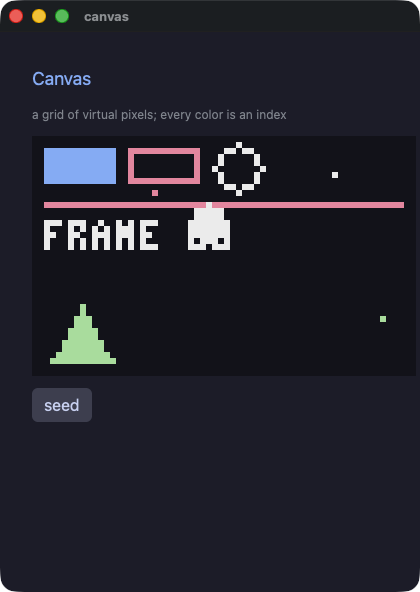
canvas is a grid of virtual pixels, painted by the commands written
in its block. Inside it a color is a NUMBER: the index of a color in
the palette the app declares. That is how tools for pixel art work, so
drawing code written for a pixel machine ports line for line with its
numbers unchanged.
A canvas
require "wakakusa"

PALETTE = ["#11111b", "#89b4fa", "#f38ba8", "#eeeeee", "#a6e3a1"].freeze

class Sky
  def initialize
    @frame = 0
  end

  def tick
    @frame += 1
  end

  def view
    canvas(64, 40, scale: 6, background: 0, palette: PALETTE) {
      rect(2, 2, 12, 6, 1)
      rect_outline(16, 2, 12, 6, 2)
      circle_outline(34, 5, 4, 3)
      line(2, 11, 61, 11, 2)
      triangle(3, 37, 8, 28, 13, 37, 4)
      circle(30, 18, 3, 3)
      pixel_text(2, 14, "FRAME #{@frame}", 3)
    }
  end
end

app = Sky.new
every(0.05) { app.tick }
run(app, title: "sky")
canvas(width, height, scale:, background:, palette:) opens the grid.
The first two numbers are the grid, in virtual pixels; scale is how
many logical pixels one of them takes, so a 64×40 canvas at six is
384×240 on screen. background and every color a command takes are
indices into palette.
The commands
| Command | Paints |
|---|---|
pixel(x, y, color) |
one virtual pixel |
line(x1, y1, x2, y2, color) |
a straight line |
rect(x, y, w, h, color) |
a filled rectangle |
rect_outline(x, y, w, h, color) |
its outline |
circle(x, y, r, color) |
a filled circle |
circle_outline(x, y, r, color) |
its outline |
triangle(x1, y1, x2, y2, x3, y3, color) |
a filled triangle |
triangle_outline(…) |
its outline |
sprite(x, y, source, u, v, w, h, colkey:, flip_x:, flip_y:) |
a rectangle cut out of an image |
pixel_text(x, y, text, color) |
a line of text in the canvas's own 4×6 font |
They are not elements: nothing here can be clicked, themed, sized or animated, they take none of the keywords every element takes, and they mean nothing outside the canvas they were written in. A loop inside the canvas is the ordinary loop, and what its body paints joins the frame where it stands.
sprite copies a rectangle out of an image that shares the canvas's
palette. colkey: names the index that is not copied — the sheet's
background — and -1 copies every pixel.
The keyboard
A game asks what the hands are doing rather than waiting to be told.
  def tick
    @x -= 2 if key_down("left")
    @x += 2 if key_down("right")
    fire if key_pressed("space")
    quit if key_pressed("q")
  end
key_down is "held right now", key_pressed is "went down since the
previous tick" (a held key answers once), and key_released is the
other edge. The names are the plain ones: "left", "right", "up",
"down", "space", "enter", and a letter is itself.
Read them in a timer, never in a view: a view that read the keyboard would draw one thing in a window and another under a script, and the gate would be comparing two different programs.
quit closes the window, which is how a game ends itself.
The two ports
demo/jump.rb and demo/shooter.rb are two of Pyxel's own examples
(Takashi Kitao, MIT), ported to this vocabulary and gated. Both draw
with sprites cut from the example's own image bank, and the port
follows the original line by line: pyxel.blt becomes sprite,
pyxel.btn becomes key_down, pyxel.cls(12) becomes the canvas
background — and 12 still means the same color, because inside a canvas
a color is an index either way.
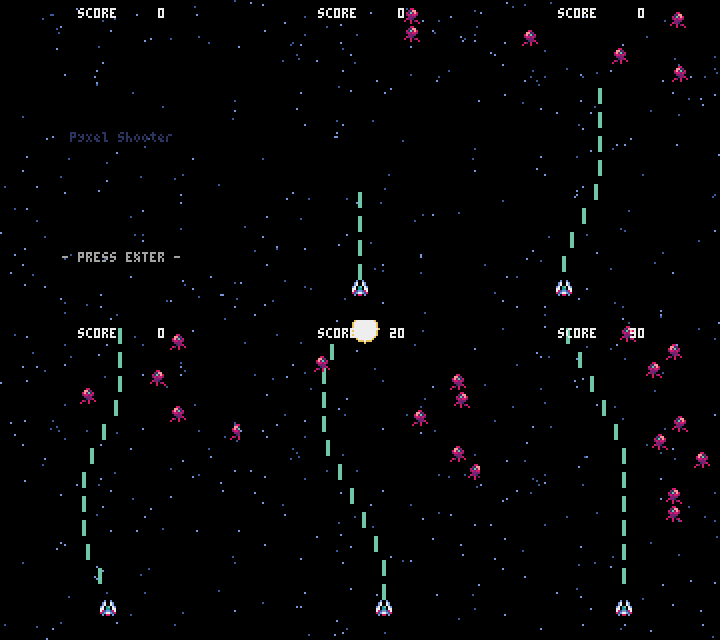
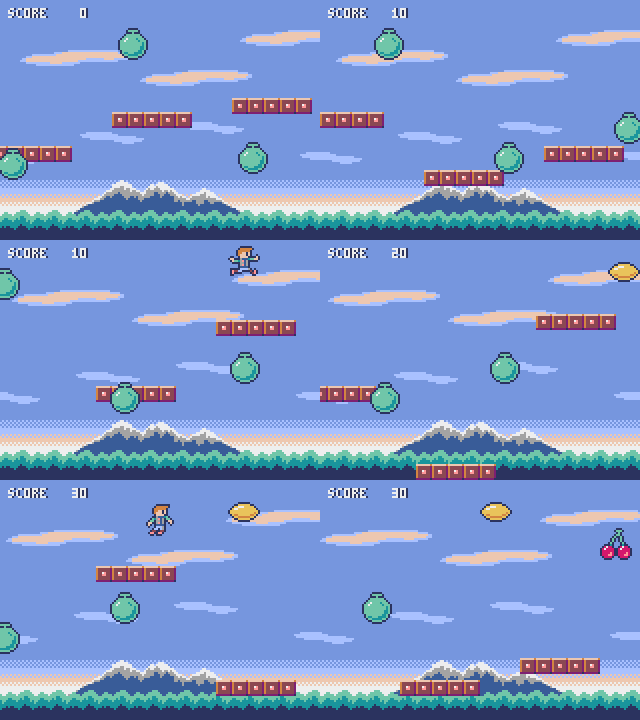
Their effects are WAV files written by tools/gen_sounds.rb rather
than the original's chiptune, since the engine plays files; a run under
a script is silent, so the gate still compares two silent runs. And
each writes its own six lines of arithmetic where the original seeds a
generator, because a seeded Random is not the same generator in the
two runs — a game whose frames cannot be compared would not be worth
gating.
Looking at a canvas with no window
WAKAKUSA_FRAMES=<dir> writes a PNG of the first canvas after every
script step, drawn by the same rasterizer the window uses, and
WAKAKUSA_FRAME_SCALE draws the grid bigger than the app asks. The
dump says what a frame IS; this says what it looks like — over ssh, in
CI, or while the screen is locked.
$ WAKAKUSA_FRAMES=frames PIXIE_SCRIPT="advance:34,advance:34" ./demo/.gate/jump
$ ls frames
0000.png  0001.png
The two GIFs above were recorded that way, from a script that plays the game.
Where next
- Look, and the window — the keywords every element takes, themes, and the window itself.
- Ruby, data, and work — Ruby's own library, a database, timers and work off the window's thread.